Evergreen Page Template Selector
Pick the template that matches what this page is mainly trying to do. If two purposes are equally important, split into two pages.
Option A — Resource Hub
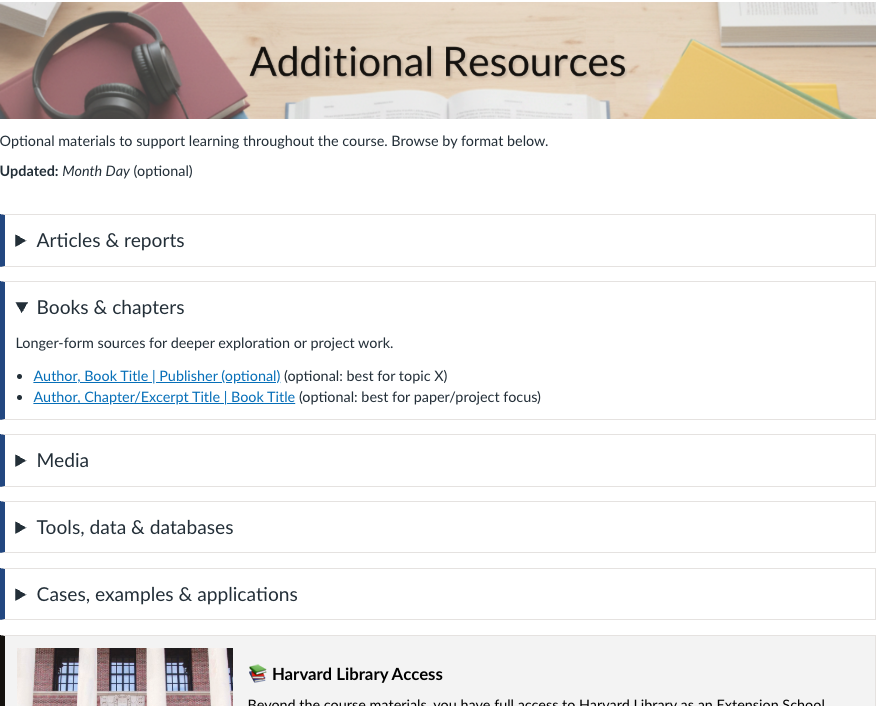
Use when: You’re curating optional or reference materials students may browse throughout the course.
- Clear categories (e.g., Articles, Books, Media, Tools)
- Jump links for quick scanning
- Expandable sections to reduce scroll fatigue
➜ Best for: “Go deeper” resources not tied to a specific week.
Common content
- Additional readings and reports
- Books and chapters
- Podcasts and videos
- Databases, tools, datasets
- Cases and examples
Option B — Policy & Expectations

Use when: The page explains course rules, grading, participation norms, or recurring expectations.
- Summary first (what students must do)
- Then details (policies, edge cases, FAQs)
- Links to official course policies where relevant
➜ Best for: homework policies, grading rules, academic integrity, participation.
Common content
- How grading works (and where to see it)
- Late work and extensions
- AI / collaboration expectations
- Communication norms
Option C — Tool / Setup Guide

Use when: Students must follow a repeatable workflow (setup, submission, peer review, or tool use).
- Numbered steps with checkpoints
- Screenshots only where they add clarity
- Troubleshooting / common issues
➜ Best for: logistics, pre-course setup, “how to submit,” peer review workflows.
Common content
- What you need before you start
- Step-by-step instructions
- Checkpoints and tips
- Common errors and fixes
Option D — Archive / Example Repository

Use when: The page is a curated collection of examples (code, cases, past work, demos).
- Organize by week/module or by theme
- Short “what to notice” notes per item
- Clear labeling of type and purpose
➜ Best for: code examples, case collections, annotated archives.
Common content
- Example links and repositories
- Sample artifacts with brief annotations
- Optional starter templates
- Archive organized by week or topic